SeatGeek Fees to Sell: What Sellers Should Know
Published September 18, 2026
Learn SeatGeek fees to sell, payout timing, resale rules, and why WeBuyTickets offers a faster no-fee alternative. Compare now.
SeatGeek Fees to Sell: What Sellers Should Know
If you’re trying to figure out SeatGeek fees to sell, you’re probably in a hurry for one simple reason: you have tickets you can’t use, and you want cash back without getting buried in listings, delays, or surprise deductions.
That’s the real tension with any ticket resale platform. SeatGeek is a major marketplace, it’s widely known, and yes, it can work well for many sellers. But if your priority is speed, certainty, and getting paid without waiting for a buyer, marketplace selling can feel slower and more expensive than expected.
This guide breaks down how selling on SeatGeek works, what sellers should watch for, and when a direct-sale option like WeBuyTickets may be the better move.
The short answer
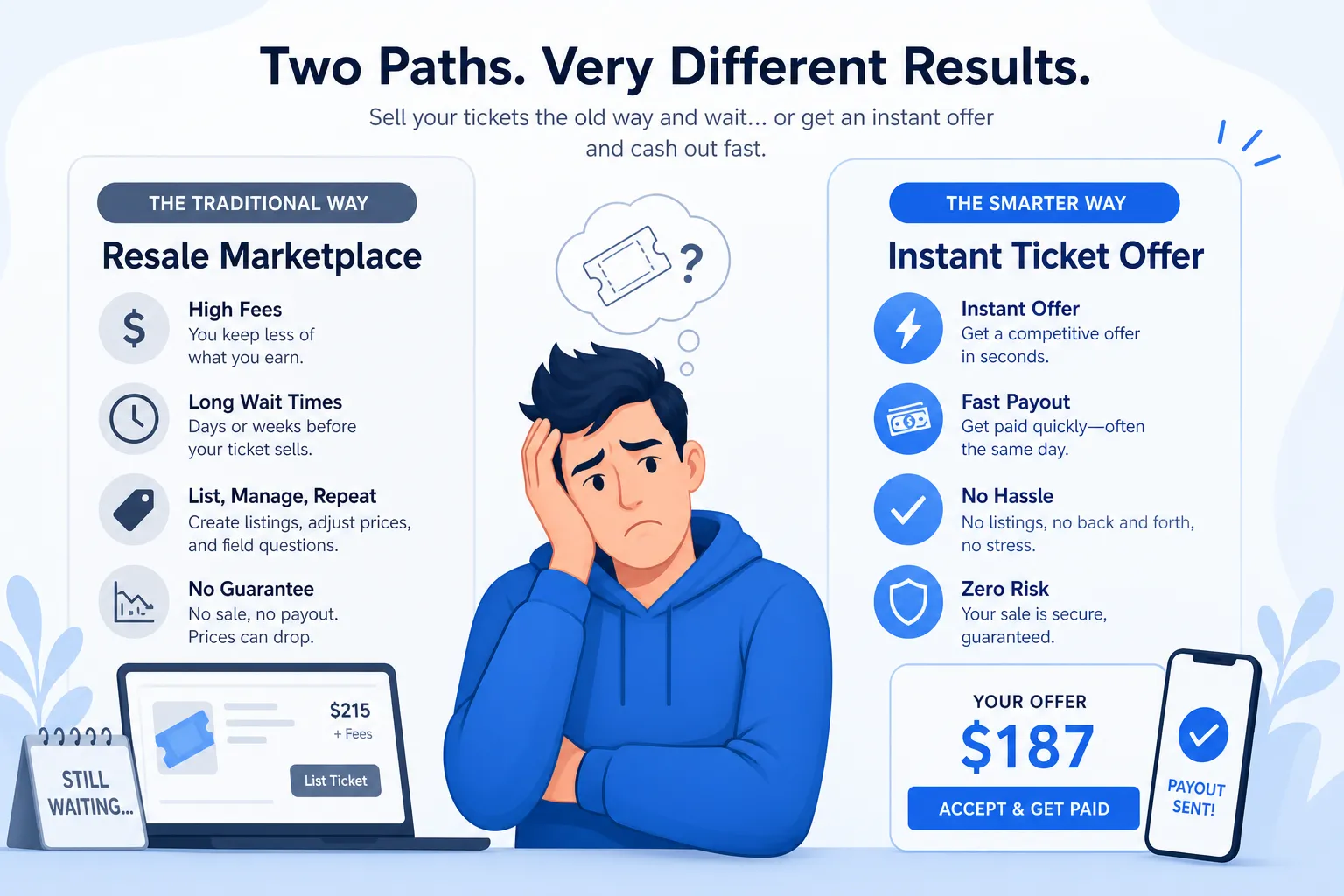
SeatGeek does not present selling as a no-cost, no-friction experience. Sellers need eligible tickets, a supported payout method, and in many cases patience while waiting for a buyer. The total cost is not just about the visible fee line. It also includes:
seller-side fee deductions
pricing pressure from competing listings
taxes and pricing inputs that affect your net
payout timing after the event
the risk of your tickets not selling at all
If you want the highest possible listing upside, SeatGeek may be worth trying.
If you want a guaranteed sale model, no seller fees, no listing work, and PayPal or Venmo payment in minutes, WeBuyTickets is often the better fit.
What SeatGeek says about selling tickets
SeatGeek’s own selling flow is fairly straightforward. If your tickets are eligible and already in your account, you can go to your tickets section, hit Sell, choose quantity, set split options, enter a price, select a payout method, and publish the listing.
A few key rules matter right away:
You must already have the tickets in your possession
Not all ticket types are eligible for resale
If you don’t see a Sell button, you may not be able to list yet
Individual resale listings are generally limited to 8 tickets unless your account qualifies for more
Some tickets transfer automatically after sale, while others require manual action
That sounds simple, and in many cases it is. But “easy to list” is not the same thing as “easy to get paid quickly.”
How SeatGeek seller fees really affect your payout
When people search for SeatGeek selling fees or SeatGeek resale fees, they usually want one number. But the seller experience is more nuanced than that.
There’s the visible fee - and then there’s the net payout reality
When you sell through a marketplace, your real outcome depends on:
Factor | Why it matters |
|---|---|
Seller fee deduction | Reduces what you actually take home |
Your listing price | Too high and tickets may not sell; too low and you leave money on the table |
Competing inventory | Similar seats nearby can force price cuts |
Ticket type | Some tickets need manual transfer steps |
Payout timing | You may wait until after the event for money |
Tax treatment/original price entry | Entering original purchase price can affect sales tax treatment |
One of the most overlooked details in SeatGeek’s flow is the original purchase price field. SeatGeek notes that if you do not enter what you originally paid, you may be charged sales tax on the full price. If you do enter it, tax may apply only to the difference between your cost and resale price. That can materially affect your numbers.
Why this matters more than the advertised fee
A marketplace fee is only part of the story. Even if the percentage feels competitive, your final result can still disappoint if:
your tickets sit unsold for days or weeks
you keep lowering the price to stay competitive
you need cash before the event
you miss the sale window entirely
This is where many frustrated sellers start looking for a faster alternative.
Is SeatGeek good for selling tickets?
For some people, yes. SeatGeek is a legitimate ticket marketplace with broad event coverage, strong app usability, and a recognizable brand in sports, concerts, and New York event tickets.
But whether SeatGeek is good depends on your goal.
SeatGeek is a better fit if you want:
access to a large buyer marketplace
the chance to set your own price
a familiar ticket resale experience
support for many mobile ticket types
tools like Smart Pricing on eligible listings
SeatGeek is a worse fit if you want:
a guaranteed sale
immediate payment
no seller fees
no listing or repricing work
a last-minute exit right up to event start time without buyer uncertainty
That second list is exactly where WeBuyTickets stands out.
SeatGeek vs WeBuyTickets: marketplace resale vs instant sale
Traditional resale marketplaces and direct-buy services solve different problems.
Quick comparison
Feature | SeatGeek | WeBuyTickets |
|---|---|---|
Do you create a listing? | Yes | No |
Do you wait for a buyer? | Yes | No |
Seller fees | Yes, affects net payout | No seller fees |
Price control | You set the listing | You get an instant fair offer |
Sale guaranteed? | No | Yes, if you accept the offer |
Payment timing | Typically after sale and often after event timing rules | PayPal or Venmo in minutes after transfer |
Best for | Sellers testing market price | Sellers prioritizing speed and certainty |
Last-minute sales | Possible, but dependent on buyer demand | Supported up to event start time |
The convenience gap competitors often miss
Most articles about ticket resale talk about “maximizing price,” but they ignore the very real cost of delay.
If you need to sell tickets fast, the better question is not “What could I list them for?” It’s:
What can I safely and quickly turn them into today?
That is the core advantage of WeBuyTickets:
60-second submission process
instant offers within minutes
no seller fees
no public listing
no waiting for a buyer
guaranteed sale model
responsive support
PayPal or Venmo payout in minutes
For busy fans, that tradeoff is often worth more than chasing an uncertain higher listing price.
How to sell tickets on SeatGeek
If your tickets are eligible, the process is usually:
Go to the tickets section of your account
Select Sell
Choose quantity
Set split options
Set your price and payout method
Review the listing and enter your original purchase price
Publish the listing
Common friction points sellers run into
Even when the steps are simple, the actual experience can stall because of:
no Sell button showing
tickets not delivered yet
unsupported ticket type
payout method eligibility limits
manual transfer requirements for third-party mobile tickets
pricing too high to attract buyers
In other words, listing is easy. Closing the sale is the hard part.
Why your tickets may not show in your account
Searches around SeatGeek no tickets, SeatGeek find my tickets, and SeatGeek my tickets are common because ticket visibility problems happen more than people expect.
Possible reasons your tickets don’t appear
Issue | What it usually means |
|---|---|
Tickets not delivered yet | You can’t list what you don’t yet possess |
Team/venue account not linked | The tickets may live in the original issuer’s account |
Different email/login used | You may be checking the wrong account |
Unsupported delivery format | PDF, screenshots, physical tickets, or wristbands may not qualify |
Transfer incomplete | The transfer may still be pending |
If your goal is just to offload tickets quickly, these delays can be incredibly frustrating. A direct buyer can often simplify the process by telling you exactly what is needed to complete a fast transfer.
Are SeatGeek tickets legit?
This is one area where SeatGeek has strong brand recognition. Questions like SeatGeek legit tickets, SeatGeek tickets legit, SeatGeek verified tickets, and SeatGeek verified resale exist because buyers and sellers both want confidence.
The practical answer
SeatGeek is a legitimate company and a major player in the resale market. It supports verified resale workflows and provides buyer-facing trust mechanisms. That said, “legit” does not always mean “frictionless.”
For sellers, legitimacy is only one part of the equation. You also care about:
whether your tickets qualify
whether they sell in time
how much you actually net
how quickly your payout arrives
what happens if buyer delivery requires manual action
A platform can be legit and still be inconvenient for sellers who are short on time.
SeatGeek app and website usability
The SeatGeek app and SeatGeek website are generally user-friendly. Most people can view seats, browse event tickets, and manage account tickets without much trouble. The interface is one reason so many people use SeatGeek for concert tickets, football tickets, stadium tickets, and events in cities like New York.
Where the experience is strong
intuitive browsing
clear event pages
visible seating maps
solid mobile experience
ticket access in one account for many supported events
Where sellers can still feel friction
account linking issues
resale eligibility confusion
delayed delivery visibility
uncertainty around net payout after fees
waiting for post-sale or post-event payment processes
Good design helps. It doesn’t remove marketplace risk.
Payment timing: when do sellers actually get paid?
This is one of the biggest content gaps in many articles.
People don’t just care about how much they’ll get. They care about when.
SeatGeek states that sellers need a valid payout method, and the sales page also highlights that payout can show up 5–8 days after your event. For sellers needing immediate money, that delay matters a lot.
SeatGeek payout limitations to know
SeatGeek currently supports payouts to:
U.S. residents with U.S. bank accounts, excluding U.S. territories
Canadian residents with Canadian bank accounts
That means not every seller has equal flexibility.
Why fast payout changes the decision
If you’re unloading extra seats because plans changed, a delayed payout may be fine.
If you’re selling because:
the event is tonight
you need money now
you’re stuck with season tickets you can’t use
you don’t want to babysit a listing
then the marketplace model becomes much less attractive.
With WeBuyTickets, you submit the ticket details, receive an offer within minutes, transfer the tickets, and get paid through PayPal or Venmo in minutes. No waiting around for event day settlement.
SeatGeek ticket resale for concerts, sports, and last-minute events
SeatGeek covers a huge range of inventory, from SeatGeek concerts and SeatGeek concert tickets to SeatGeek football tickets, broad sports inventory, and major venue events.
That makes it useful for many sellers. But category matters.
Concert tickets
Concert resale is highly sensitive to demand swings. Artist hype, weather, opening acts, and local competition can all move prices quickly. If you list too high, your tickets may sit. If you list too low, they can sell fast - but at a disappointing net.
Sports and stadium tickets
Football and stadium ticket resale often depends on opponent quality, playoff implications, injuries, and timing. A large marketplace helps, but it also means competing against a lot of similar inventory.
Last-minute events
This is where direct sale services often win. If the event is close, the value of certainty rises sharply. A marketplace may still work, but the closer you get to start time, the more stressful repricing and waiting become.
WeBuyTickets was built for this exact use case, including last-minute ticket sales up to event start time.
What makes SeatGeek different from Ticketmaster?
A lot of users compare SeatGeek Ticketmaster because both are major names in ticketing, but they are not identical experiences.
At a high level
Category | SeatGeek | Ticketmaster |
|---|---|---|
Marketplace identity | Strong resale marketplace presence | Primary + resale ecosystem |
User experience | Clean, mobile-forward browsing | Broad event control and primary inventory strength |
Seller experience | Eligibility-based marketplace listing | Similar resale tradeoffs depending on event and integration |
Fees | Vary by transaction and market conditions | Vary by event, inventory source, and resale setup |
Best comparison point | Resale convenience and app experience | Access to primary inventory and event control |
The important takeaway: both platforms can involve seller fees, wait times, and payout delays. If your priority is avoiding all three, neither marketplace is the cleanest solution.
The hidden costs of marketplace selling
A lot of articles focus too narrowly on the posted fee percentage. Sellers should also consider the hidden costs of using a marketplace.
1. Time cost
Creating a listing, setting a price, monitoring demand, editing the listing, and handling transfer steps takes time.
2. Uncertainty cost
There is always the possibility your tickets simply do not sell.
3. Discounting pressure
To stay competitive, you may need to cut prices repeatedly.
4. Delayed cash flow
Even after a sale, payment may not be immediate.
5. Error risk
Wrong split settings, transfer delays, or account confusion can complicate fulfillment.
These are exactly the pain points WeBuyTickets removes.
When WeBuyTickets is the smarter choice
There’s a reason more sellers are moving away from the traditional “list and wait” model when speed matters.
WeBuyTickets is ideal if you:
want an offer in minutes
don’t want to build a listing
want to avoid seller fees
need guaranteed sale certainty
want payment through PayPal or Venmo fast
are selling close to event time
have no patience for marketplace back-and-forth
The process is simple
Submit your ticket details in about 60 seconds
Receive an AI-powered offer within minutes
Transfer the tickets
Get paid via PayPal or Venmo in minutes
That’s it.
No pricing games. No waiting for buyers. No wondering whether your listing will be seen.
Final verdict: is SeatGeek worth using to sell tickets?
SeatGeek is a real, established marketplace and can absolutely work for sellers who want to test market pricing and are comfortable waiting.
But if your core question is really:
How do I sell my tickets quickly, safely, and without getting nickel-and-dimed?
then the better answer is often WeBuyTickets.
SeatGeek works best when you want marketplace exposure and are willing to accept the tradeoffs:
seller fees
listing management
buyer uncertainty
delayed payout timing
WeBuyTickets works best when you want:
an instant offer
no seller fees
no listing required
no waiting for buyers
guaranteed sale certainty
payment in minutes
support even for last-minute sales
If convenience, speed, and trust matter more than chasing an uncertain top-dollar listing, WeBuyTickets is the smarter move.
FAQ
How much does SeatGeek charge in seller fees?
SeatGeek seller fees can vary, so the most important number is your net payout after deductions. Sellers should also factor in pricing pressure, taxes, and delayed payout timing - not just the visible fee line.
Is it hard to sell on SeatGeek?
No, the basic listing process is fairly simple if your tickets are eligible and already in your account. The harder part is often waiting for a buyer, pricing competitively, and managing payout timing.
Why are fees so high on SeatGeek?
Marketplace selling includes more than a simple posting fee. Sellers may feel the cost through fee deductions, competitive price cuts, taxes, and the risk of not selling in time.
Who has higher fees, SeatGeek or Ticketmaster?
There is no universal winner because both platforms can vary by event, inventory source, and resale setup. If your priority is avoiding marketplace fees altogether, a direct-sale option like WeBuyTickets is often the more predictable choice.